Advertiser Disclosure
GOBankingRates works with many financial advertisers to showcase their products and services to our audiences. These brands compensate us to advertise their products in ads across our site. This compensation may impact how and where products appear on this site. We are not a comparison-tool and these offers do not represent all available deposit, investment, loan or credit products.
Does Your LinkedIn Profile Need a Makeover?
Written by
Cynthia Measom

Commitment to Our Readers
GOBankingRates' editorial team is committed to bringing you unbiased reviews and information. We use data-driven methodologies to evaluate financial products and services - our reviews and ratings are not influenced by advertisers. You can read more about our editorial guidelines and our products and services review methodology.
20 YearsHelping You Live Richer
Reviewed by Experts
Trusted by Millions of Readers
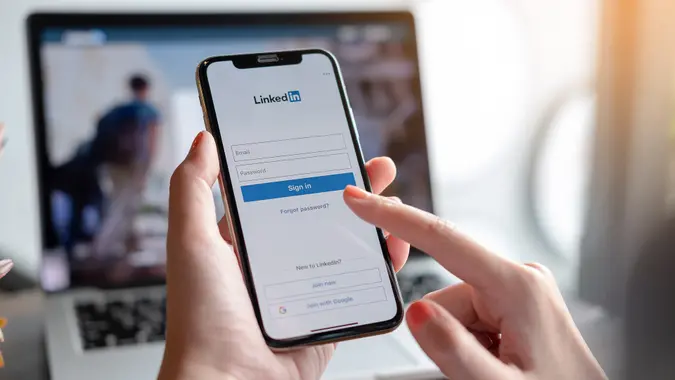
Out with the old and in with the new. It’s an adage that applies to many things in the dawn of a new year — including your LinkedIn profile.
See:
Related:
In the age of the pandemic, face-to-face meetings are less probable. Hiring managers and recruiters are relying much more on gathering intel on prospective candidates online, and your LinkedIn profile is the perfect resource.
According to current statistics from LinkedIn, 40 million people are using the platform for job searches each week and three people are hired every minute. That’s some stiff competition.
To see how you virtually measure up to other job seekers on the platform, take a look at these six key indicators to see if it’s time for a LinkedIn profile makeover. If you’re guilty of any of these shortfalls, you’ll find the information and tips you need to make your LinkedIn profile shine and stand out among the masses.
Last updated: Sept. 30, 2021
Your Headline Is Generic
First impressions are golden opportunities. Your LinkedIn profile’s headline not only tells hiring managers and recruiters what you do but also conveys the potential value you can bring to the table. To get noticed, it’s critical to go beyond LinkedIn’s default headline that simply lists your job title followed by the company you work for.
Optimize your headline by using keywords that describe your career niche and top skills. Also add that you are actively seeking a position if that’s the case. Here’s an example:
Jake Smith|Marketing Strategist|Digital Branding|Data Analytics|Experienced and Available for Full-Time Opportunity
Your ‘About’ Section Is Boring
Once someone makes it past your headline, you’ll want to keep them interested. Jazz up a lackluster “About” section by adding keywords and phrases that will attract your target employers. Remember, your goal is to educate your audience on what makes you the perfect fit for a particular position. Try these tips to beef up this section:
- Write in first person to make your profile more relatable, personable and real.
- Add at least three quick-hitting metrics that showcase your strongest achievements, such as “I increased quarterly sales 20% by analyzing consumer trend forecasting.”
- Write two or three compelling sentences to explain why you work in your current position/industry.
- Use subheadings to organize information in short and snappy paragraphs that leave plenty of white space.
Your Photo Falls Flat
According to LinkedIn’s research, you increase your profile’s chances of being viewed by 14 times when you add a picture. But not just any picture will do. If you can afford to have professional headshots made, consider it. If not, put your smartphone to work, recommends LinkedIn. Here are some tips to get the perfect photo for your profile:
- Dress the part. Think about hiring managers’ expectations.
- Aim for a confident, yet engaging expression to draw people in. Avoid huge smiles or blank stares.
- Stick with a solid background and crop the photo into a headshot to keep the focus on you. A faraway or fuzzy shot just won’t do.
You can also amp up the visual appeal of your profile — and give insight into who you are and what you can offer — by adding a carefully chosen background banner image. Check out Canva or Adobe Spark for free, customizable templates.
You Don’t Have Any Recommendations
Most of your LinkedIn profile includes information you’re presenting on your own behalf. But don’t discount the power of including other professional’s opinions, which can help you gain credibility in a potential employer’s eyes.
LinkedIn offers users an “Ask for a Recommendation” feature that allows you to ask other LinkedIn members — first-degree connections who are familiar with your skills and achievements — to write you a personal recommendation that you can display in your profile. There’s no limit to the number of recommendations you can request and receive, and you can choose to make them visible on your profile or not.
You Aren’t Showcasing Your Skills
While education matters, showcasing your actual skills can attract employers and set you apart from other LinkedIn job seekers. According to LinkedIn research, LinkedIn Skill Assessments can increase your chances of getting hired by 30%.
You can find available Skill Assessments in the Skill section of your profile — you’ll see options like Microsoft Excel, Adobe Photoshop and various coding languages. Once you complete an assessment, the results are kept private; so if you don’t do as well as you would have liked, no one has to know. If you do decide to display the results, you’ll have an option to add a “verified skill” badge to your profile, according to LinkedIn.
Your Work History Isn’t All It Can Be
Beef up your work history in the Experience section of your profile. Remember, you’re competing with 40 million other job seekers each week, so make your professional achievements and experience stand out. Here are some helpful tips to strengthen this section:
- Add relevant keywords to job titles. This can improve your chances of being found in search results.
- Add key achievements and contributions to each job role.
- Eliminate off-putting clichés from your work history, such as “I’m a team player,” “I’m results driven” or “I know how to think outside the box.”
More From GOBankingRates
- Nearly 1 in 3 Americans Hit by a Costly Holiday Scam, Norton Survey Shows -- How To Avoid This
- Here's What the Average Social Security Payment Will Be in Winter 2025
- How Middle-Class Earners Are Quietly Becoming Millionaires -- and How You Can, Too
- The Easiest Way to Score $250 for Things You Already Do
Share this article:
You May Also Like
I Asked ChatGPT What Will Happen To the Economy If the Fed Keeps Cutting Interest Rates: Here's What It Said
December 04, 2025
6 min Read
6 Ways Trump's Closing This Major Consumer Advocacy Agency Could Impact Your Finances
December 04, 2025
6 min Read
4 Grocery Items That Have Gotten Much More Expensive Since Trump Took Office
December 02, 2025
6 min Read
If You Earn $100K a Year, Here's Where You Actually Rank Among All Americans
December 02, 2025
6 min Read
If the Top 10 Billionaires' Wealth Was Distributed Equally in America, How Much Money Would Each Person Get?
December 03, 2025
6 min Read
22 States in or Near a Recession Right Now -- and What It Means for Residents
December 03, 2025
6 min Read
Make your money work for you
Get the latest news on investing, money, and more with our free newsletter.
By subscribing, you agree to our Terms of Use and Privacy Policy. Unsubscribe at any time.

Thanks!
You're now subscribed to our newsletter.
Check your inbox for more details.

Sending you timely financial stories that you can bank on.
Sign up for our daily newsletter for the latest financial news and trending topics.
For our full Privacy Policy, click here.
Looks like you're using an adblocker
Please disable your adblocker to enjoy the optimal web experience and access the quality content you appreciate from GOBankingRates.
- AdBlock / uBlock / Brave
- Click the ad blocker extension icon to the right of the address bar
- Disable on this site
- Refresh the page
- Firefox / Edge / DuckDuckGo
- Click on the icon to the left of the address bar
- Disable Tracking Protection
- Refresh the page
- Ghostery
- Click the blue ghost icon to the right of the address bar
- Disable Ad-Blocking, Anti-Tracking, and Never-Consent
- Refresh the page