HSBC Routing Number: What It Is and How To Find It
 Written by
Sean Dennison
Written by
Sean Dennison
 Edited by
Joe Evans, CFHC™
Edited by
Joe Evans, CFHC™

Commitment to Our Readers
GOBankingRates' editorial team is committed to bringing you unbiased reviews and information. We use data-driven methodologies to evaluate financial products and services - our reviews and ratings are not influenced by advertisers. You can read more about our editorial guidelines and our products and services review methodology.

20 Years
Helping You Live Richer

Reviewed
by Experts

Trusted by
Millions of Readers
The HSBC routing number you’ll use most often is: 022000020
This is the bank’s primary ACH routing number used for everyday transactions like direct deposits, bill payments and transfers between accounts.
HSBC confirms this as its standard routing number for electronic payments. But here’s the key detail: HSBC uses multiple routing numbers, depending on the type of transaction and location.
HSBC Routing Numbers: At a Glance
Transaction Type Routing Number ACH/Direct deposit 022000020 Domestic wire transfer 021001088 Fedwire (general) 021001088 Fedwire (California) 122240861 Wire transfer routing numbers differ from ACH numbers, so using the correct one is critical to avoid delays.
What Is an HSBC Routing Number?
A routing number is a 9-digit code that identifies your bank during financial transactions. It’s used for:
- Direct deposits
- ACH transfers
- Wire transfers
- Check processing
Routing numbers are part of the U.S. banking system and help ensure money is sent to the correct institution.
Why HSBC Has Multiple Routing Numbers
Unlike some banks, HSBC uses different routing numbers based on:
- Transaction type (ACH vs wire)
- Location of your account
- Internal processing systems
For example:
- ACH routing number = 022000020
- Wire routing number = 021001088
This system helps route payments correctly across different networks.
How To Find Your HSBC Routing Number
You can locate your routing number in several ways:
1. Check Your Bank Account Online
Log in to your HSBC account and view account details.
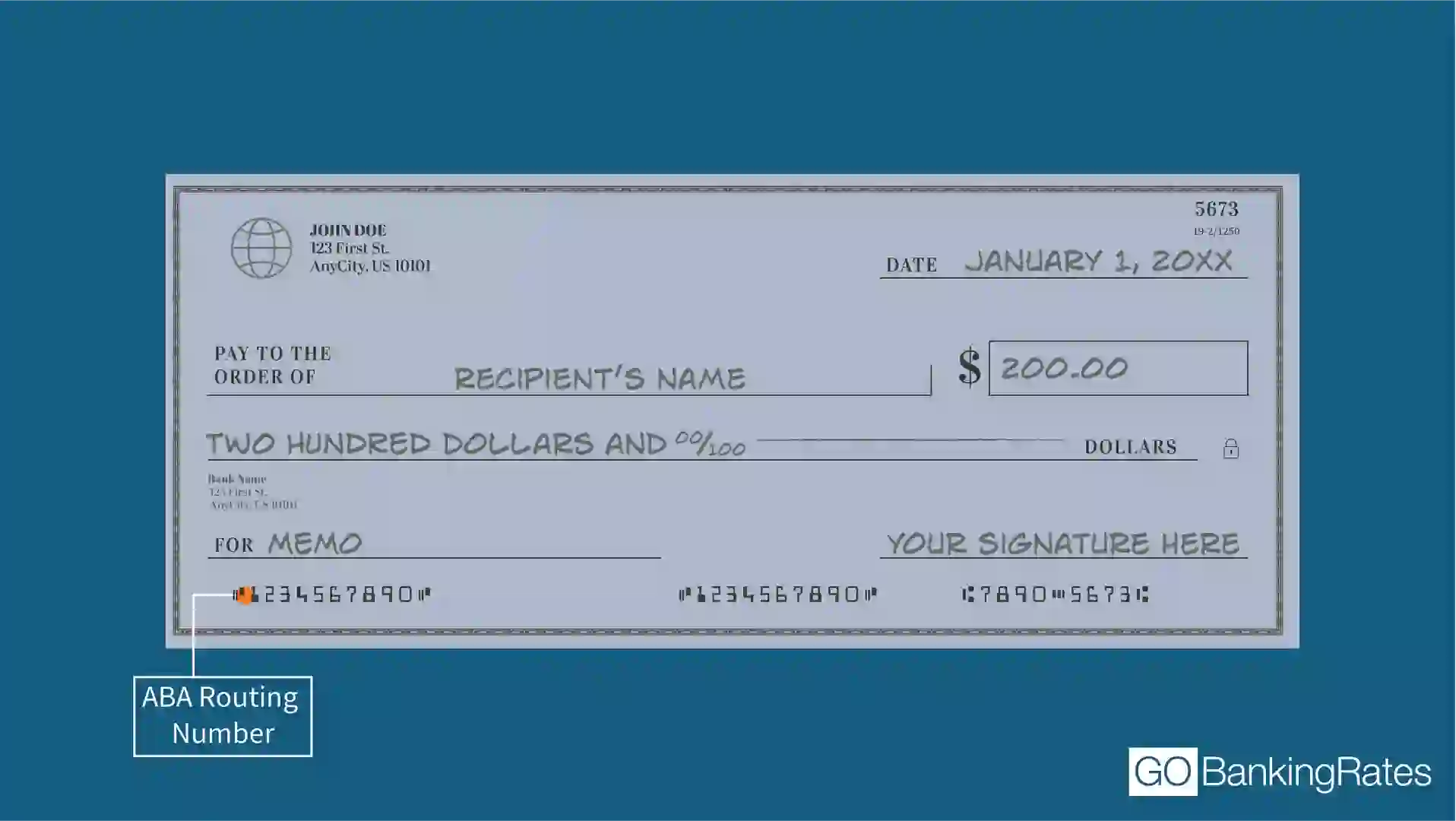
2. Look at a Check
Your routing number is the first 9 digits at the bottom left.
3. Check Your Bank Statement
Routing numbers are often listed alongside your account details.
4. Use HSBC’s Official Website
HSBC provides routing numbers for different transaction types.
ACH vs Wire Routing Numbers
| Feature | ACH Routing Number | Wire Routing Number |
|---|---|---|
| Used for | Direct deposit, bills | Bank-to-bank transfers |
| Speed | 1 to 3 days | Same day (often) |
| HSBC example | 022000020 | 021001088 |
Using the wrong routing number can cause:
- Delays
- Failed transactions
- Returned payments
Real-World Example
Let’s say you want to:
- Set up direct deposit = use 022000020
- Send a wire transfer = use 021001088
Using the wrong number could delay your payment.
Common Mistakes to Avoid
1. Using the Wrong Routing Number
ACH and wire transfers use different numbers.
2. Assuming One Number Works for Everything
HSBC uses multiple routing numbers. Always verify.
3. Not Double-Checking Before Sending Money
Errors can lead to delays or failed transactions.
Benefits vs Tradeoffs
| Category | Must use the correct type | Tradeoffs |
|---|---|---|
| Accuracy | Ensures correct transfers | Must use correct type |
| Flexibility | Supports multiple transaction types | Can be confusing |
| Speed | Enables electronic payments | Errors cause delays |
Quick Decision Guide
Setting up direct deposit? Use 022000020
Sending a domestic wire? Use 021001088
Receiving an international wire? Use SWIFT code (not routing number)
Not sure which number to use? Check your HSBC account or confirm with the bank
Final Take to GO
The HSBC routing number depends on how you’re using your account.
Most common number: 022000020 (ACH)Wire transfers: 021001088
The key takeaway:
- Always match the routing number to the transaction type
- Double-check before sending money
The smart move: Save the correct routing numbers for your most common transactions to avoid delays.
HSBC Routing Number FAQ
- What is the routing number for HSBC?
- The most common HSBC routing number is 022000020, used for ACH transfers and direct deposits.
- Is the HSBC routing number the same for all states?
- No. HSBC may use different routing numbers depending on the transaction type or location.
- What routing number do I use for wire transfers?
- For most domestic wire transfers, HSBC uses routing number 021001088.
- Where can I find my HSBC routing number?
- You can find it on your checks, bank statements or by logging into your HSBC account.
- Do I need a routing number for international transfers?
- No. International transfers typically require a SWIFT code instead of a routing number.
- What happens if I use the wrong routing number?
- Your transaction may be delayed, rejected or returned.
More About HSBC
Data is accurate as of March 25, 2026, and is subject to change.
Editorial Note: This content is not provided by any entity covered in this article. Any opinions, analyses, reviews, ratings or recommendations expressed in this article are those of the author alone and have not been reviewed, approved or otherwise endorsed by any entity named in this article.
Our in-house research team and on-site financial experts work together to create content that’s accurate, impartial, and up to date. We fact-check every single statistic, quote and fact using trusted primary resources to make sure the information we provide is correct. You can learn more about GOBankingRates’ processes and standards in our editorial policy.